
Otter.ai is being sued for what it did with your meetings. Read AI has been banned by universities. Here's what I built instead — and why.
My calendar has a growing list of recurring meetings across multiple organisations — daily standups, weekly partner syncs, leadership reviews — and I cannot be in all of them. The obvious fix is a meeting notetaker. The obvious choices turned out to be a legal and governance problem, not a convenience — so I built my own, self-hosted, with the audio and transcript never leaving infrastructure I control. This is why, what it cost, and where the line actually sits between "I did this for myself" and "I could do this for your company."
The trigger
"Read the transcript later" isn't a system — it's a hope. What I needed was narrow: find out what happened in a meeting I wasn't in, get my action items into my own tracker, and never think about it again. That's a search for a notetaker. What I found looking at the market changed the decision entirely.
What's actually happening to companies that used the obvious tools
This isn't a hypothetical privacy concern. It's active litigation and institutional bans, and it's worth reading the primary sources rather than taking my word for it.
Otter.ai — a federal class action, consolidated December 2025
Four lawsuits filed against Otter.ai between August and September 2025 were consolidated into
one federal class action in December 2025. The allegation isn't just "it recorded without
consent" — it's that Otter used those recordings to train its own speech-recognition
models, and that it structured its terms so customers, not Otter, carry the legal
responsibility for getting attendees' consent. The claims span the federal Electronic
Communications Privacy Act, California's Invasion of Privacy Act, and Illinois's Biometric
Information Privacy Act — statutes with damages of up to $10,000, $5,000, and $5,000 per
violation respectively, against a user base Otter itself put above 35 million. A motion-to-dismiss
hearing was held in May 2026.
Read the analysis — Workplace Privacy Report →
· UC Today's coverage →
Read AI — banned outright, not merely criticised
Chapman University investigated Read AI and prohibited its use, citing security, privacy, and
institutional data risk. The University of Washington's IT department issued a
required deactivation notice. The specific mechanic both flagged: once
connected to a calendar, Read AI can join, transcribe, and summarise meetings the account
holder isn't even attending — without the awareness or consent of the other people in the
room.
Chapman University's notice →
· University of Washington IT →
Read AI says it doesn't train on meeting content unless a customer opts in, and offers workspaces where that's contractually impossible. Take that at face value — it still leaves the actual question untouched:
A privacy policy is a promise about behaviour. Self-hosting is a fact about architecture. Policies get revised, companies get acquired, and a promise you skimmed in an email six months ago can change. The question isn't whether you trust them today — it's whether there's anywhere for this to go wrong once you've handed it over.
And no policy fixes the bigger problem: you cannot un-share a transcript. My standups routinely cover live security-incident status, a regulator's position, staffing constraints. None of that belongs in someone else's bucket, under someone else's future decisions.
What I built
A self-hosted meeting bot, on my own infrastructure, that joins Google Meet calls it's invited to, reads the transcript, and delivers a summary and my own action items straight into the tools I already use — no audio or transcript ever leaves my network, and no cloud transcription service is in the loop at all. Attendee, an open-source project, joins the call. Everything after that — summarising, routing to my task list, delivery to the right chat — is mine.
The capture technology isn't proprietary. Attendee is open source (Elastic License 2.0 — free to run internally, can't be resold as a hosted service). Any competent engineering team could build the shape of this. The build notes further down are what it actually took.
The design is two halves joined by one deliberately thin handoff — a transcript plus a calendar event id, nothing else crosses the line:
That thin handoff is what makes the capture side swappable — Attendee today, something else tomorrow — without touching anything downstream.
What it actually gets you, beyond "the data stays put"
- Routing, not just a transcript. Action items that are genuinely mine become tasks with due dates in my own tracker; the summary lands in the right conversation for that project — not a webpage I have to remember to check.
- A prompt tuned to one reader, not the median user. The summariser knows I didn't attend and that its whole job is telling me what I missed — a hosted product optimises for everyone at once.
- Your own quality rules. Speech transcripts hallucinate on room noise. Mine is told to treat isolated fragments as noise rather than quote them back as if someone said them — a rule I can add because I own the pipeline.
- Transcription is free, at any volume. The bot reads the platform's own live captions — there's no per-minute transcription bill hiding behind the setup, whether it sits in one meeting a day or every meeting on the calendar. The only running cost is the Workspace seat the identity needs, and that's fixed, not usage-based.
| Approach | Transcription cost | Where your data goes |
|---|---|---|
| Hosted meeting-bot API (e.g. Recall.ai) | ~$0.50 + $0.15/hr | Their cloud |
| Otter.ai / Read AI / similar | Bundled in subscription | Their cloud — see above |
| This setup — platform captions | $0, any volume | Never leaves my network |
Costs and limits
- A paid Google Workspace seat is unavoidable for a bot that signs in properly — that's architectural, not a fee someone forgot to remove. A consumer Google account has no path to it.
- You own the maintenance. A platform can change its meeting UI whenever it likes, and self-hosting makes that your problem, not a vendor's SLA.
- What I run today is a single-person setup — one CTO, one task list, whatever meetings I'm invited to. A company-wide version — many employees, many simultaneous meetings, someone else's Workspace identity — is a different build, not a copy-paste of mine.
If this is a live question for your company
If your team has looked at Otter, Read AI, Fireflies, or similar and something about "an outside company sees our meetings" doesn't sit right — that instinct is correct, and it's exactly what I look at in an Engineering Velocity Audit or a technical due diligence engagement: where your data actually goes, what it costs you if it goes wrong, whether a self-hosted alternative is worth the engineering effort for your size and risk. No price here — a company rollout is a different build from what I run for myself. Scope it on a call.
If this is a live question for your company, let's talk about what your data exposure actually looks like.
I read every message and reply personally.
Want to see it, not just read about it? Here's what it actually looks like day to day — the bot in a real meeting, a real notes output, and how it plugs into the tools I already use.
How it works
Invite the bot's account to a calendar event and that's the whole interface — no dashboard, no app to open. It shows up on the guest list, joins on time by itself, and sits in the meeting like any other participant:
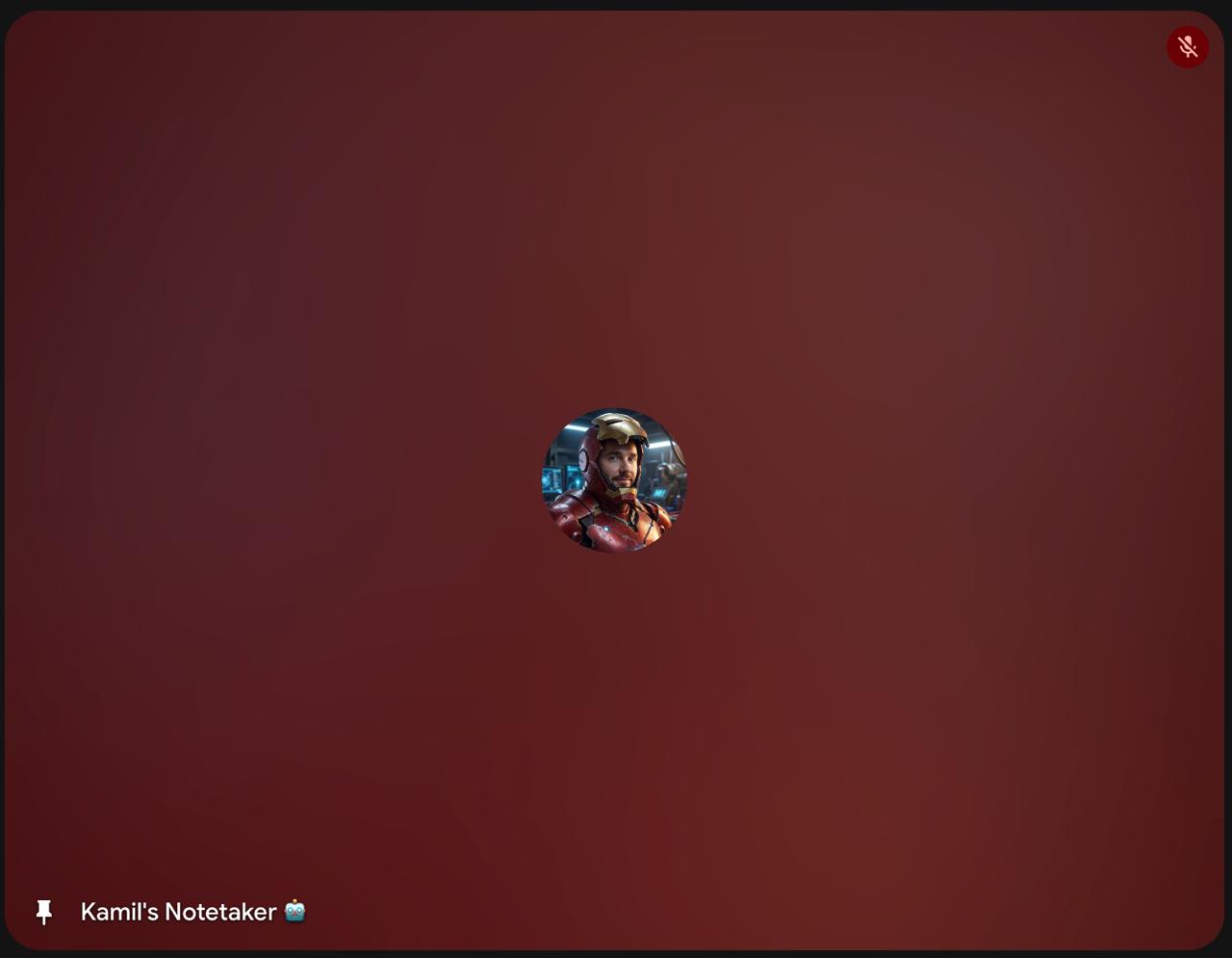
Behind that tile: it reads Google Meet's own live captions (no audio leaves the network), and when the meeting ends, a summariser turns the transcript into structured notes — what happened, what was decided, what's blocked, and what's actually mine to do. Here's a real one, with names swapped for the write-up:
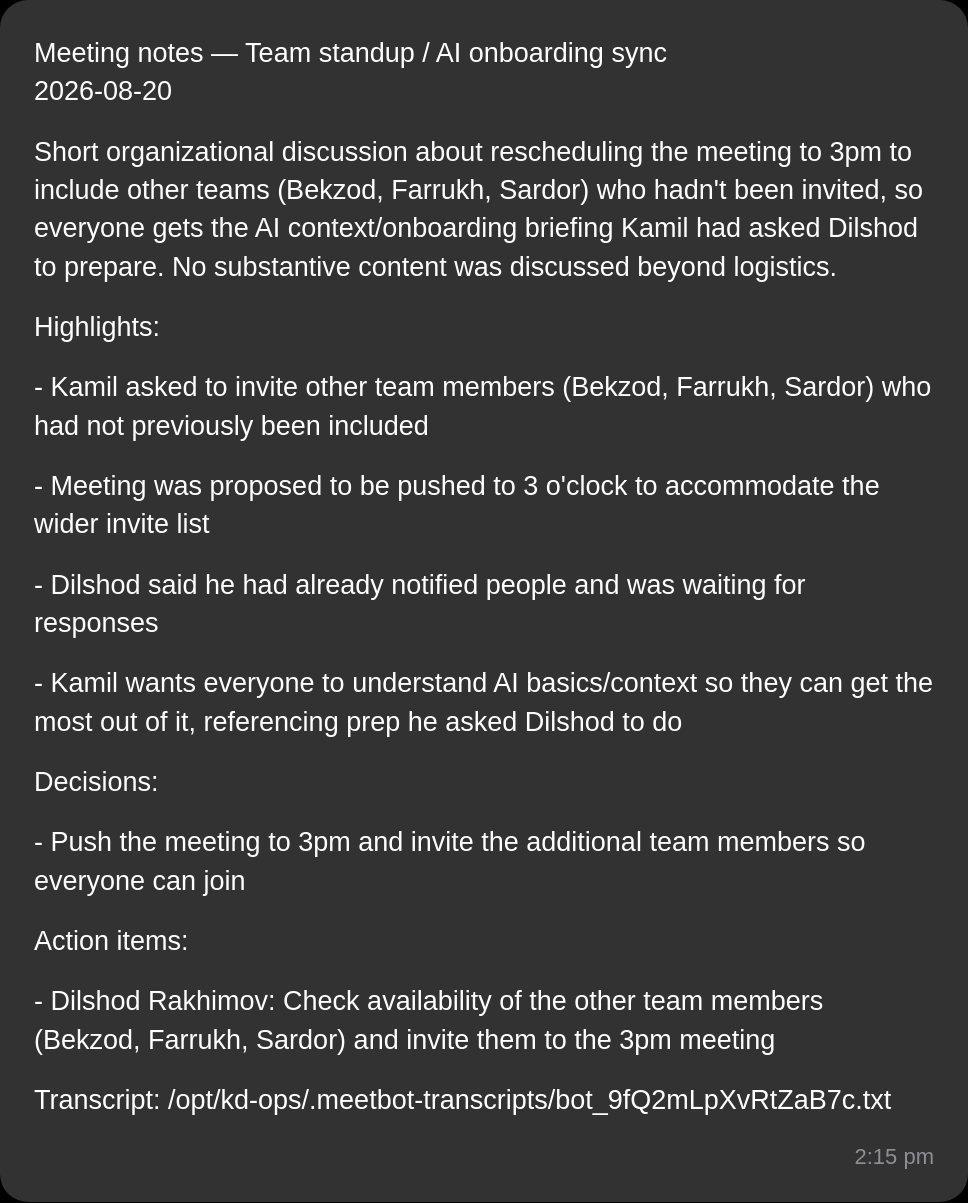
The part that actually saves time isn't the summary — it's what happens to it next. Action items that are genuinely mine become real tasks, with a due date, filed under a label I can filter on across every project:
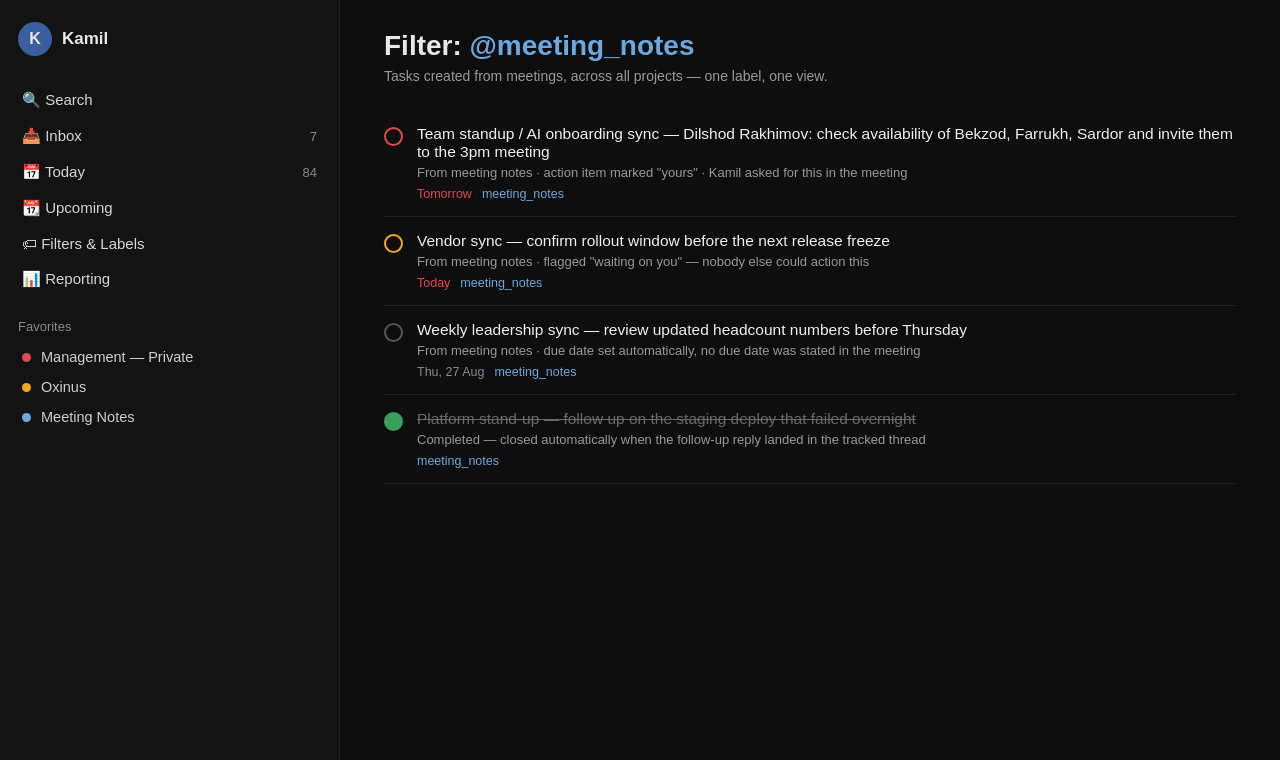
meeting_notes label — one filter, every project, nothing to hunt for.Rules I could only add because I own the pipeline
A hosted vendor summarises for their median customer. Mine only has one reader, and that shows up as actual rules in the prompt, not settings in a menu:
- Speech transcripts hallucinate on silence and room noise — not vaguely, specifically: one early test produced "Algonquin too much now!" and "Mojito." from an empty room. The summariser is told outright to treat isolated fragments as noise and never quote them back as if someone actually said them.
- An owner name only counts if it's mine. The rule is explicit: mark an action item as mine only when it's genuinely my task or explicitly blocked on me — not just mentioned near my name in the transcript. Otherwise every meeting would hand me half the room's to-do list.
- No task without a due date. Todoist only surfaces tasks with a date in the daily view — an undated task is invisible and never gets worked. Every action item gets one, even when the meeting never stated it.
It also works while the meeting is still running
The transcript is readable live, not just after the call ends — so a question like "what's been discussed so far?" gets answered from what's actually been said, mid-meeting, without me being in the room. I tested this exact thing while writing this piece: asked what had been said in a call I wasn't attending, and got the real answer back before the meeting even finished.
"So how is yours any safer?"
Fair question, and the right one to ask anyone making this argument. Building it yourself doesn't automatically make it safe — it makes the security posture yours, which is only an improvement if you actually do something with it. What that means concretely here:
- It isn't on the internet. The capture service listens on a private overlay network only — not the public internet, and not even the local LAN. Upstream's default binds to every interface; that was the first thing changed, because the alternative is a live signed-in Google session and a pile of transcripts reachable from anything on the network.
- There's no cloud bucket, so there's nothing to misconfigure. The captions path writes no media at all and the stack holds no object-storage credentials. The single most common way this class of tool leaks — a storage bucket left readable — doesn't exist as a failure mode here.
- It runs on hardware I already owned. A NAS on my own network, alongside other services. There's no per-meeting compute bill and no third party in the data path — which is the whole point, and also why the running cost is essentially the Workspace seat and electricity.
- The blast radius of the risky part is deliberately tiny. The one genuinely dangerous component — the SSO identity — lives in a throwaway tenant containing nothing anyone depends on. If it were ever compromised, there is nothing there to reach.
What self-hosting does not buy you: a vendor's security team, their audit history, or their patch cadence. You're taking that on. For meeting content specifically, I'll make that trade every time — but it is a trade, not a free upgrade, and anyone selling it as free hasn't run one in production.
Build notes: where the time actually went
None of the time went where you'd expect. Standing up the containers took an afternoon. Everything below is what came after — real dead ends, in the order they cost me a day each. If you're weighing "we could just build this ourselves," this is the list to read first.
1. A signed-in meeting bot doesn't use a password
This is the one that surprises people. A bot that joins Google Meet as a real signed-in account authenticates over SAML — your capture server acts as an identity provider, Google redirects to it, it signs an assertion with a private key. Three consequences fall out of that, none of them optional: the bot must live on a paid Workspace account (a consumer Google account has no admin console and literally cannot host the profile); it must not be an admin (Google lets super-admins bypass SSO, so an admin bot never triggers the flow at all); and the SSO profile you create redirects sign-in for everyone it covers — scope it wrong on a live company domain and you lock real staff out of their own accounts.
That last point is why mine runs in a throwaway tenant on a domain nobody depends on. It costs one seat and removes the only genuinely dangerous step in the build. On a client's production identity system, that decision is not one to get wrong on a Friday.
2. The bug that ate a day: a cookie flag
First SAML attempt failed with an unhelpful login error. Google's side was fine — it was
returning a perfectly valid assertion request. The actual cause: the capture server marks
its session cookie Secure by default, Chrome refuses to store a
Secure cookie over plain HTTP, so the cookie silently vanished and sign-in
failed for lack of it. One setting fixed it. Nothing in any log said "cookie."
The upside discovered along the way: Google accepted an http:// sign-in URL
without complaint, so no TLS termination or certificate work was needed at all.
3. Being in the right domain doesn't get you into the meeting
Anonymous joining simply doesn't work for a Workspace-hosted Meet — you get a flat "You can't join this video call" with no ask-to-join button. What actually admits the bot is being on the calendar guest list. And there's a trap inside that: if an organiser has set "guests can't invite others," adding the bot via the API returns success and Google silently discards it. No error, no bot, and nothing to tell you why until the meeting starts without it.
4. The bot that kept joining and leaving in front of everyone
For a while the bot would join, vanish, rejoin — several times, visibly, in front of the room. Root cause: a dialog's close button was being clicked while it was still animating, which throws "element not interactable." Upstream classified that as a retryable join failure, so every failed click restarted the entire join instead of retrying the click. Three failures in a two-minute window before it settled. The fix was a JavaScript click instead of a native one — two lines, once you know that's what you're looking at.
5. Operational edges you only learn by hitting them
- Restarting the capture service drops any bot currently in a meeting — mid-call, and whatever it hadn't yet written is gone. So routine maintenance has to check "is anything live right now?" first, which is not a question most deploy scripts think to ask.
- The default config publishes on every network interface. Left alone, that puts meeting transcripts and a live signed-in Google session on your LAN. Mine binds to a private overlay interface only.
- Concurrency is capped per bot account. Two meetings at 10:00 means either a second bot identity or a collision — and the login pool hands out accounts least-recently-used, with no check for "this one is already in a call."
- Caption language is set per meeting, and on some platforms it isn't yours to set. On Meet the language is the bot's own. On Teams and Zoom, changing it changes captions for every participant in the call — a settings change on your side that alters other people's experience.
- A bot that joins an empty room leaves again. It auto-departs after about a minute alone, which is correct behaviour and also means a bot dispatched too early is simply gone before anyone arrives.
What's next — and what I haven't built
Meet's captions are free and fast, but they handle one language at a time with no auto-detect — a real limit for teams that mix languages mid-sentence, which is common running teams across several countries. That's a genuine opening to do better than the platform itself: run the audio locally through a speech-to-text model like Whisper instead of (or alongside) captions, and you get auto-detection and real code-switching handling that Meet's own captions simply don't offer, still without any audio leaving the network. I haven't built that layer for myself — the setup above runs on captions alone — but the architecture already leaves room for it, and it's exactly the kind of extension I'd scope in for a team that genuinely operates across languages.
Want to talk through what a version of this looks like for your team?
I read every message and reply personally.